Visual parts diagram for Shark Apex DuoClean uprights. Identify every component, find part numbers, and learn what can be replaced vs what is permanent.
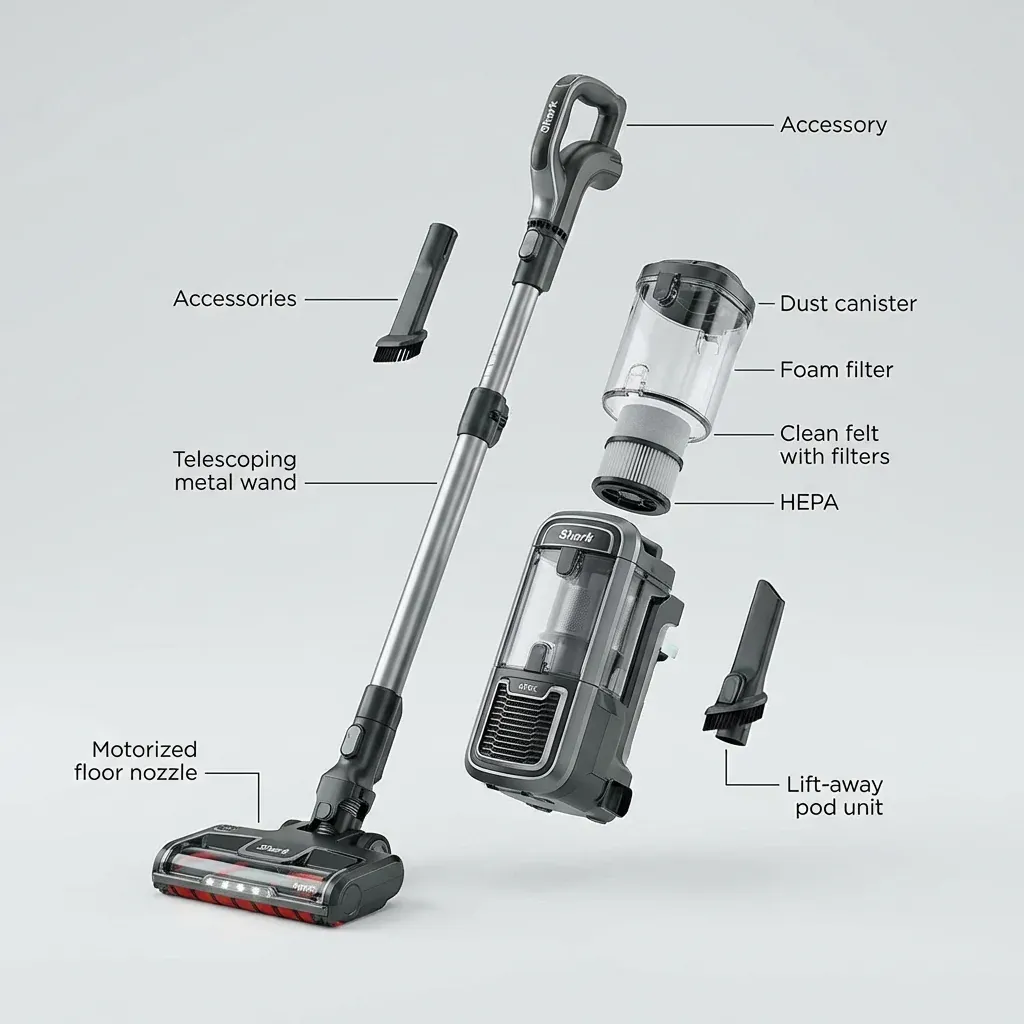
This guide helps you identify every part of your Shark Apex DuoClean upright vacuum. Use this to find part numbers for replacements or to understand what can be repaired.
Visual parts diagram for Shark Apex DuoClean uprights. Identify every component, find part numbers, and learn what can be replaced vs what is permanent.
- Symptoms: Need to order a replacement part, Want to identify a broken component, Looking for Apex parts diagram
- Tools: none
- Difficulty: Easy
MAIN COMPONENTS
1. Handle & Controls
- Power Button: Turns vacuum on/off.
- Suction Control Slider: Adjusts suction power.
- Cord Wrap Hooks: Store the power cord.
2. Main Body (Motor Housing)
- Contains the motor and main electronics.
- Lift-Away Button: Releases the canister for portable cleaning.
- Headlight: Illuminates the cleaning path.
3. Dust Bin (Canister)
- Capacity: Approximately 1.1 quarts.
- Bottom Release: Opens to empty debris.
- Filter Access: Top opening for filter removal.
4. Filters
| Filter | Location | Part Number (Example) |
|---|---|---|
| Foam Filter | Inside dust bin | XFF680 |
| Felt Filter | Under foam filter | XFF680 |
| HEPA Filter | Top exhaust | XHF680 |
5. Floor Nozzle (DuoClean Head)
- Soft Front Roller: Picks up large debris on hard floors.
- Bristle Rear Roller: Agitates carpet fibers.
- Floor Type Switch: I (Hard Floor), II (Carpet).
6. Hose & Wand
- Upper Hose: Connects handle to body.
- Lower Hose: Connects body to floor nozzle.
- Wand Extension: For above-floor cleaning.
REPLACEABLE PARTS
| Part | Can Replace? | Where to Buy |
|---|---|---|
| Filters (Foam, Felt, HEPA) | Yes | Amazon, Shark.com |
| Brush Rolls (Both) | Yes | Amazon, Shark.com |
| Belts | Yes | Amazon, Shark.com |
| Dust Bin | Yes | Shark.com |
| Hoses | Yes | Amazon, Shark.com |
| Floor Nozzle | Yes (expensive) | Shark.com |
| Motor | No (Service only) | N/A |
| Handle/Body | No (Service only) | N/A |
Shark Steam Mop Not Steaming: Unclog & Fix Guide
FINDING YOUR MODEL’S PART NUMBERS
- Find your model number on the back of the vacuum.
- Go to sharkclean.com/parts.
- Enter your model number.
- The site shows all compatible parts with pictures and prices.
Common Shark Apex Models
- AZ1002 (Apex UpLight)
- AZ1000 (Apex DuoClean)
- AZ1500 (Apex with Zero-M)
TIP: Before buying third-party parts, compare with OEM prices. Shark’s official parts are often only slightly more expensive and come with guaranteed compatibility.